Medical practice software · South Africa
Clinical care and billing. Connected, for South African practices.
GreenNotes connects clinical records, AI-assisted notes and letters, prescribing, and medical billing for South African practices. Its mobile apps and web portal support different parts of the practice workflow, with separate products and add-ons for clinical care, billing and medical-aid claims.
- Built for
GPs, specialists, allied health, clinics and billing bureaus
- Platforms
iOS, Android and the web portal, one shared record
- Clinical
From R960 per clinician / month, admin seats free
- Billing and claims
Separate products, priced per seat and confirmed in a demo
What GreenNotes is
One patient record. Separate products around it.
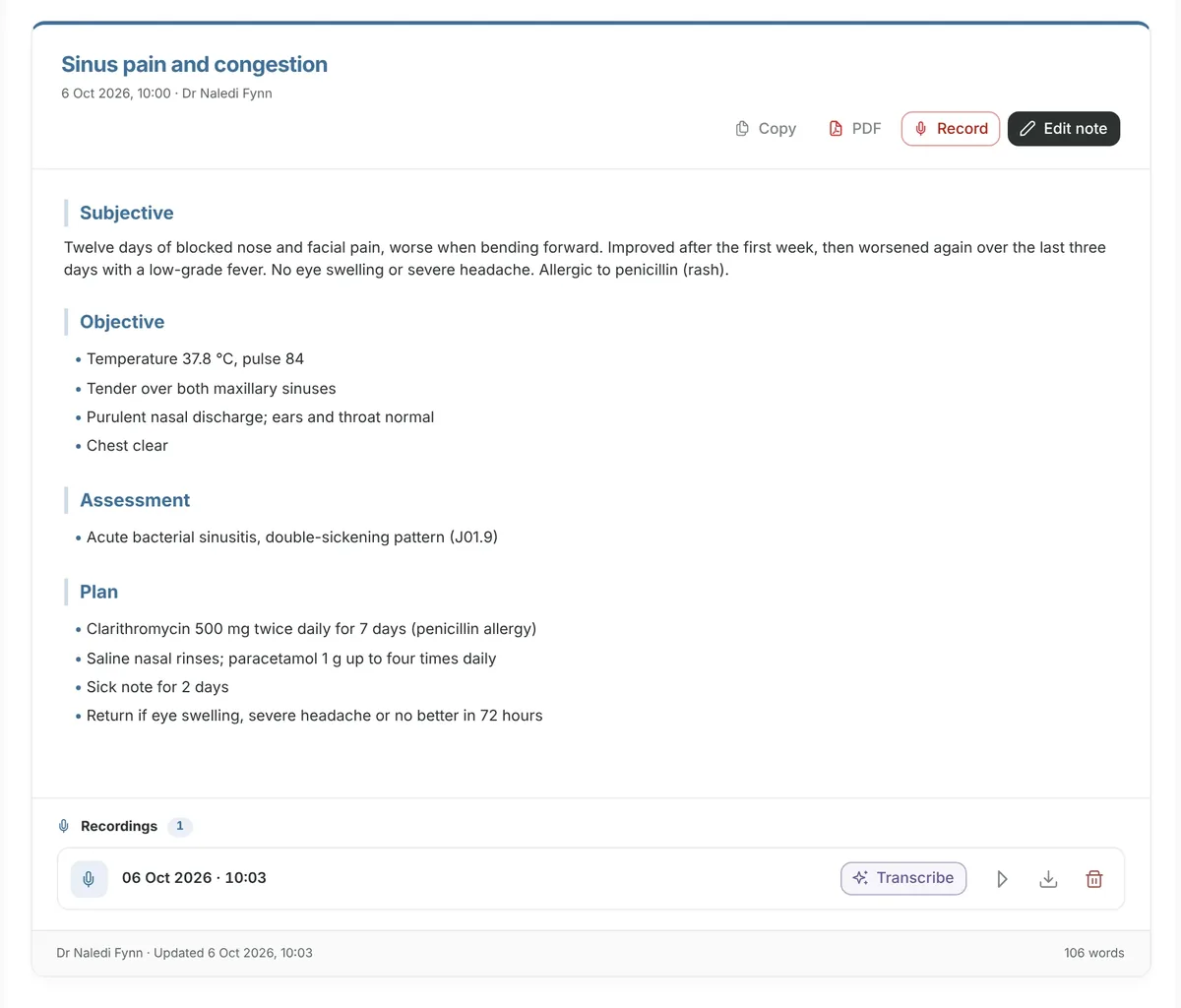
GreenNotes is practice software made in South Africa for clinicians who want their clinical notes and their billing in the same place. A clinician records a consultation on a phone or in the browser, reviews the AI-drafted note, and sends letters from it. The practice team then creates the invoice from that consultation, submits the medical-aid claim, records the payment and follows up the account.
Each part is a product you choose. GreenNotes Clinical is the clinical record. Scripts adds prescribing. GreenNotes Billing adds invoicing, payments, statements and reports, and the Medical Aid Claims add-on connects Billing to medical schemes. A practice can start with Clinical alone and add Billing later, and a billing bureau can work in a practice’s billing on free seats.
“Connected” means information carries between the steps, not that the steps happen by themselves. People create invoices, review codes, submit claims and record payments. The consultation-to-claim walkthrough shows exactly where.
The workflow
From intake to account follow-up.
Which product handles each step, and what your team still does. Follow one consultation through
| Step | Product | What GreenNotes does | What your team does |
|---|---|---|---|
| 1. Patient intake | GreenNotes Clinical | Appointments, reminders by email, WhatsApp or SMS, custom intake forms and remote intake links, consent signed on-device or by link. | Book the appointment and send the intake or consent link. |
| 2. Consultation | GreenNotes Clinical | Records the consultation on iOS, Android or the web portal. | Tell the patient, obtain consent, start and stop the recording. |
| 3. Reviewed clinical record | GreenNotes Clinical | Transcribes the recording and drafts a structured note; can include ICD-10 codes; drafts letters from selected notes. | Review and edit the note and every letter before relying on them. |
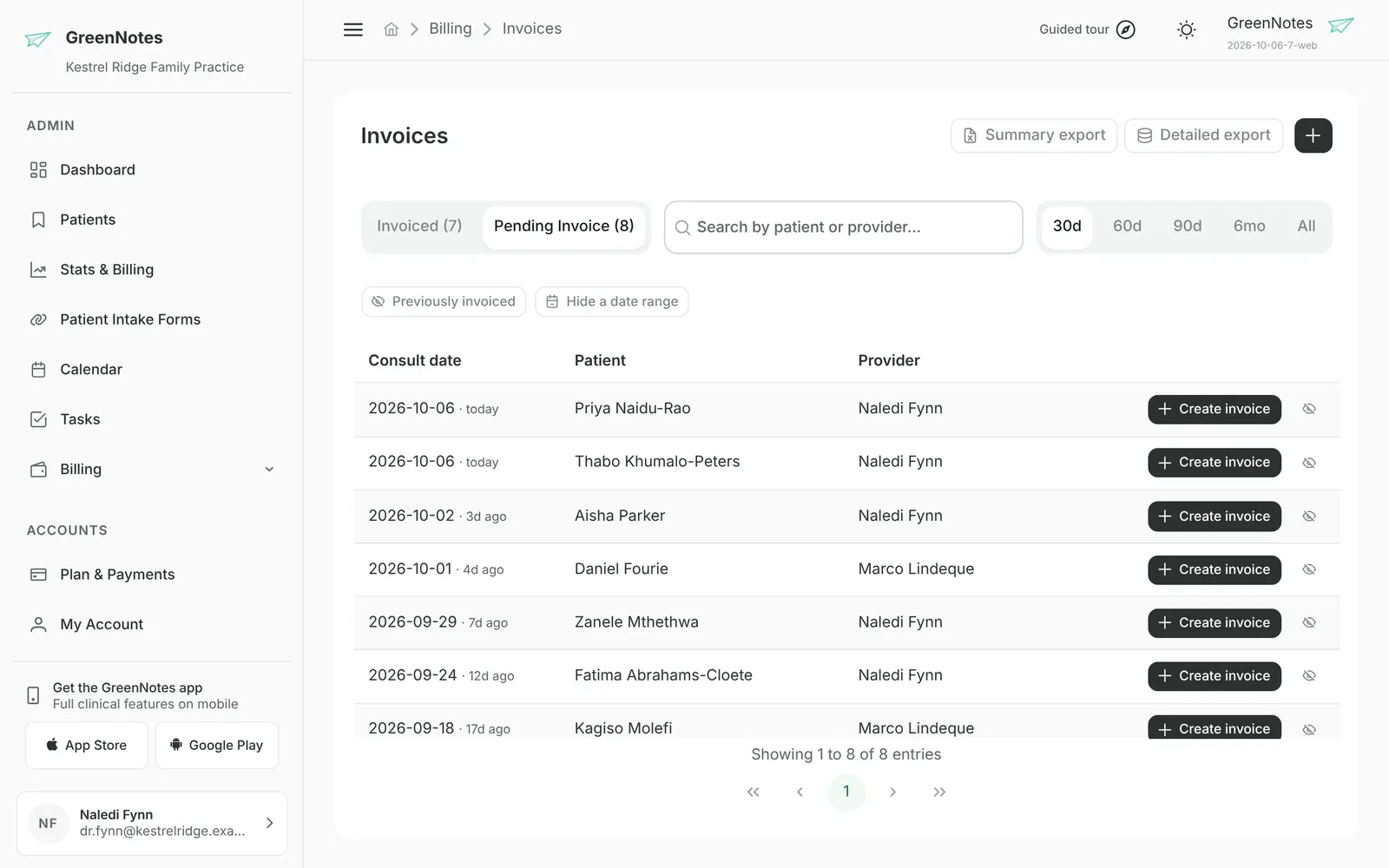
| 4. Invoice | GreenNotes Billing | Lists finished consultations not yet billed. Creating an invoice from one fills patient, provider, date, referring doctor and recorded codes. | Choose Create invoice, add or adjust tariff items, modifiers and prices, then issue. |
| 5. Claim | Medical Aid Claims add-on | FamCheck cover checks, pre-submission checks, submission from the issued invoice, status and the scheme’s reason, AI help with rejections. | Run the check, fix flagged problems, submit, act on the response. |
| 6. Payment recording | GreenNotes Billing | Matches electronic remittances to claims and lines (with Medical Aid Claims). Records receipts and allocates them to invoice lines. | Record and allocate each payment. Money moves outside GreenNotes. |
| 7. Account follow-up | GreenNotes Billing | Statement snapshots with running balances and overdue notices, billing notices by WhatsApp or SMS, ageing views and 25 reports. | Decide when to send statements and how to follow up overdue accounts. |
Products and add-ons
What is included, and what is separate.
Published prices are for Clinical. See pricing
| Product | What it covers | How it is priced | Prerequisites |
|---|---|---|---|
| GreenNotes Clinical | Patient records, AI notes, AI letters, calendar, intake, consent, tasks, WhatsApp and SMS messaging, practice settings and permissions | R960 per clinician / month (Software Only). Admin staff seats free. 14-day free trial. | None for the trial |
| Scripts | Prescribing with the Medprax medicine registry, scheme lookups and equivalents; optional EMGuidance handoff | Add-on, managed in the web portal. 3-day free trial. | EMGuidance handoff uses the clinician’s own EMGuidance account and API key |
| GreenNotes Billing | Invoices, payment allocation, receipt batches, journal, refunds, statements, ageing, 25 reports | Per seat, for each team member who works in Billing | Demo; no free trial |
| Medical Aid Claims | FamCheck, pre-submission checks, claim submission and status, reversals, AI claim help, electronic remittances | Billing add-on: per seat, plus usage fees for claims and checks | GreenNotes Billing, claims enrolment, a verified provider, claims permission per staff member |
| Live Pricing (Medprax) | Tariff and product price lookups when preparing invoices | Practice-wide subscription, no per-member seat | None stated |
| Devices (optional) | A secured Android device, device management, rugged case and setup | R320 per device / month, or R4 840 once | None |
Mobile and web
The same record. Different strengths.
The apps are built for the consulting room; the web portal adds administration, billing and claims. These are the verified differences, not a full feature list.
| Capability | iOS and Android apps | Web portal |
|---|---|---|
| Record consultations, transcribe, generate AI notes | Yes | Yes |
| Generate AI letters from notes and recordings | Yes | Yes |
| Patient records, notes, letters and consents | Yes | Yes |
| Recording pauses on silence and for incoming calls | Yes | No |
| Record without a connection; cached records and queued edits | Yes, syncs when connected | No: needs a connection |
| Document scanner (auto-fill patient details from a photo or PDF) | Yes | No |
| Body maps, WHO growth charts, COIDA W.Cl.4 and W.Cl.5 reports | Yes | No |
| Team members, permissions, practice settings, subscriptions | Shows your team; manage in the portal | Yes |
| Billing, medical-aid claims, statements and reports | No | Yes |
| Optional biometric or device lock | Yes | Not applicable |
Is it a fit?
Who GreenNotes suits, and when it may not.
Usually a good fit
- Solo and group practices that want clinical notes and billing on one patient record.
- GPs, specialists and allied health professionals (physiotherapists, dietitians, psychologists, occupational and speech therapists and others) who write notes and letters after every session.
- Clinicians who consult in Afrikaans or English and want the note in a language they choose.
- Practices that bill medical aids themselves, or through a billing bureau that works in the practice’s own screens.
- Clinicians who move between a phone in the consulting room and a computer at the desk.
- Practices moving from another system: we import your clinical data free of charge, with a fast turnaround, and regenerate back-dated invoices for outstanding accounts. See switching to GreenNotes.
Check carefully first if you need
- AI notes without any internet connection: recording works offline on mobile, but AI processing does not.
- Fully automatic invoicing or AI-suggested tariff codes: invoices are created and reviewed by your team.
- Card or payment processing: GreenNotes records and allocates payments; it does not move money.
Evidence
What clinicians say. In their own words.
GreenNotes Medical is rated 5.0 on the App Store and 4.9 on Google Play (checked 7 October 2026).
“GreenNotes has transformed my paper-based practice to paperless. I can consult in Afrikaans and seamlessly convert it into highly accurate SOAP-formatted notes in English.”
Clinicians describe the change in their own words on our customer stories page. Those quotations are qualitative.
Go deeper
Explore the parts that matter to you.
Clinical
AI clinical notes
Recording, transcription, languages, review and limits.
Read moreWorkflow
From notes to claims
One consultation followed through billing, step by step.
Read moreBuying guide
How to choose software
A checklist you can use on any vendor, including us.
Read moreMoving
Switching to GreenNotes
Free clinical data import, setup, billing and exports.
Read moreBy specialty: GPs · specialists · allied health · psychologists · dietitians · clinics
Questions
Good questions. Straight answers.
Is GreenNotes an EMR or a billing system?
Both, as separate products. GreenNotes Clinical is the clinical record, with AI-assisted notes and letters. GreenNotes Billing handles invoices, payments, statements and reports, and the Medical Aid Claims add-on handles cover checks, claims and remittances. They share one patient record, so a consultation can become an invoice without retyping the patient’s details.
Is everything included in one subscription?
No. The published prices (from R960 per clinician per month) are for GreenNotes Clinical. Scripts, GreenNotes Billing, Medical Aid Claims and Live Pricing (Medprax) are priced separately: Billing per seat, Medical Aid Claims per seat plus usage fees for claims and checks, and Live Pricing as one practice-wide subscription. Billing figures are confirmed in a demo.
Does GreenNotes create invoices or submit claims automatically?
No. Your team chooses Create invoice on a finished consultation; GreenNotes fills the empty fields from the consultation, and you review the items, codes and prices before issuing. Claims are submitted by authorised staff from an issued invoice. GreenNotes does not suggest tariff codes with AI.
Can I use GreenNotes on my phone and my computer?
Yes. The iOS and Android apps and the web portal share the same practice records, and you can record and generate AI notes and letters on any of them. Some clinical tools are only in the apps, and team management, billing and claims are in the web portal.
Does GreenNotes work offline?
Partly. In the mobile apps, recording, cached records and queued edits work without a connection and sync when you reconnect. AI transcription and generation, medicine lookups and sending need internet access.
Where is patient information stored?
The system of record is hosted in South Africa (Google Cloud, Johannesburg), and clinical fields are encrypted with keys unique to each practice. AI transcription and generation use services outside South Africa, in the European Union and the United States. The practice remains the responsible party under POPIA; GreenNotes acts as its operator under a published Data Processing Agreement.
How do I try it?
Create an account at app.greennotes.co.za for a 14-day free trial of GreenNotes Clinical, with no card needed. Billing and Medical Aid Claims have no free trial: book a personal demo or join a live billing webinar.
Next step
Start with Clinical. Add billing when you are ready.
Try GreenNotes Clinical free for 14 days, no card needed. For Billing and Medical Aid Claims, book a personal demo of your billing day.