Medical billing and claims software for South African practices and billing bureaus. Connect your clinical notes to invoices, real-time medical aid claims, payments and patient accounts, with AI help when a claim comes back.
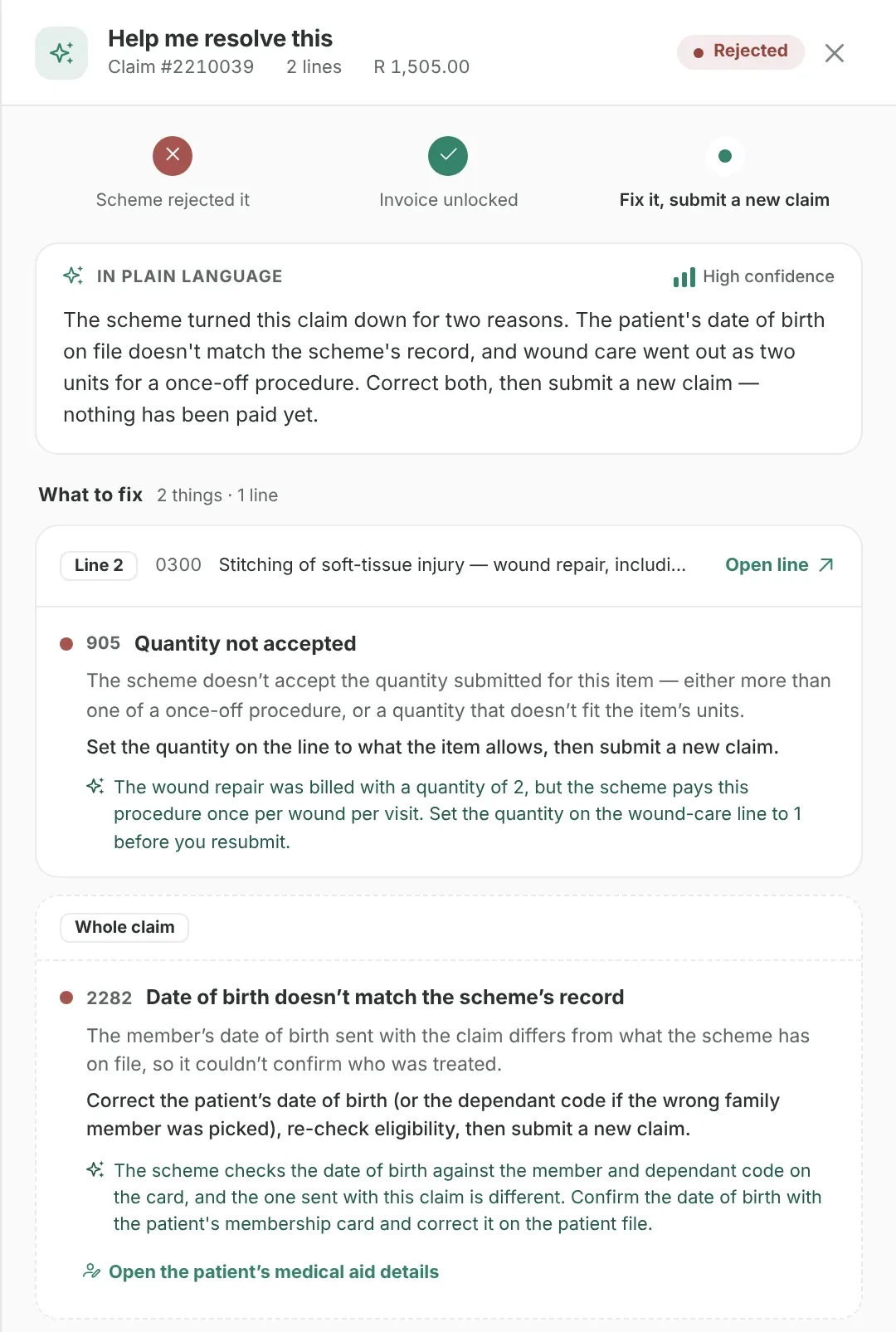
A rejected claim, explained by Help me resolve this. The real GreenNotes portal, sample data.
Built for South African practices
Traceable financial records
Control access for each team member
Two-factor sign-in & encrypted records
See it in action
Billing & Claims. Now live.
Watch a walkthrough of medical aid claims with AI-assisted help, connected invoicing and the billing bureau portal.
Medical aid claims
Fewer rejections. Faster fixes.
Rejected medical aid claims cost your team time and your practice money. GreenNotes helps before the claim goes out and after it comes back.
Before you send
Catch rejections before they happen.
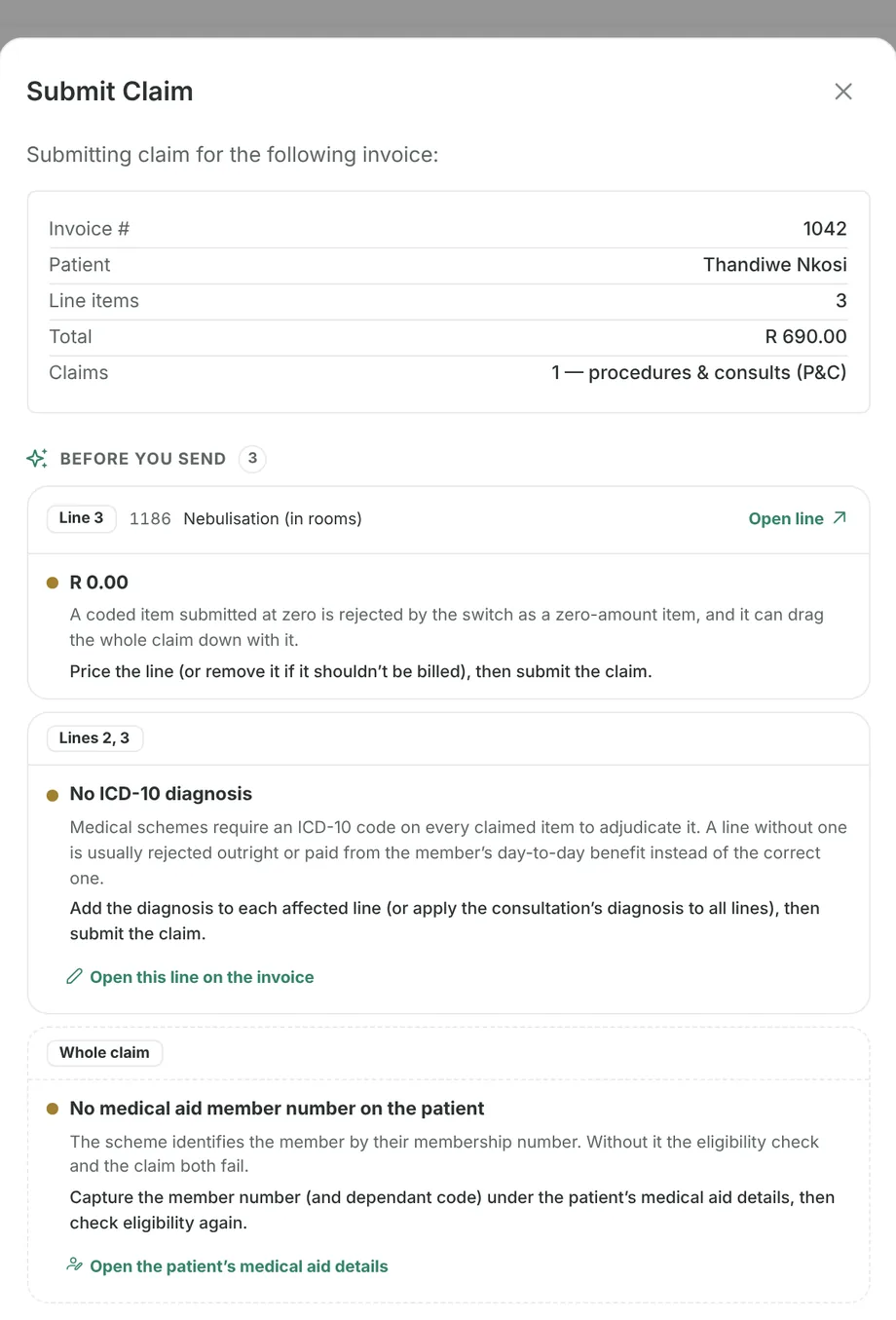
GreenNotes checks each claim for the problems that most often get it rejected: a missing or invalid ICD-10 code, an uncoded or zero-priced line, a missing member number, a service date in the future or more than four months ago. It shows you where to fix each one.
Claim tracking
Every claim’s status, at a glance.
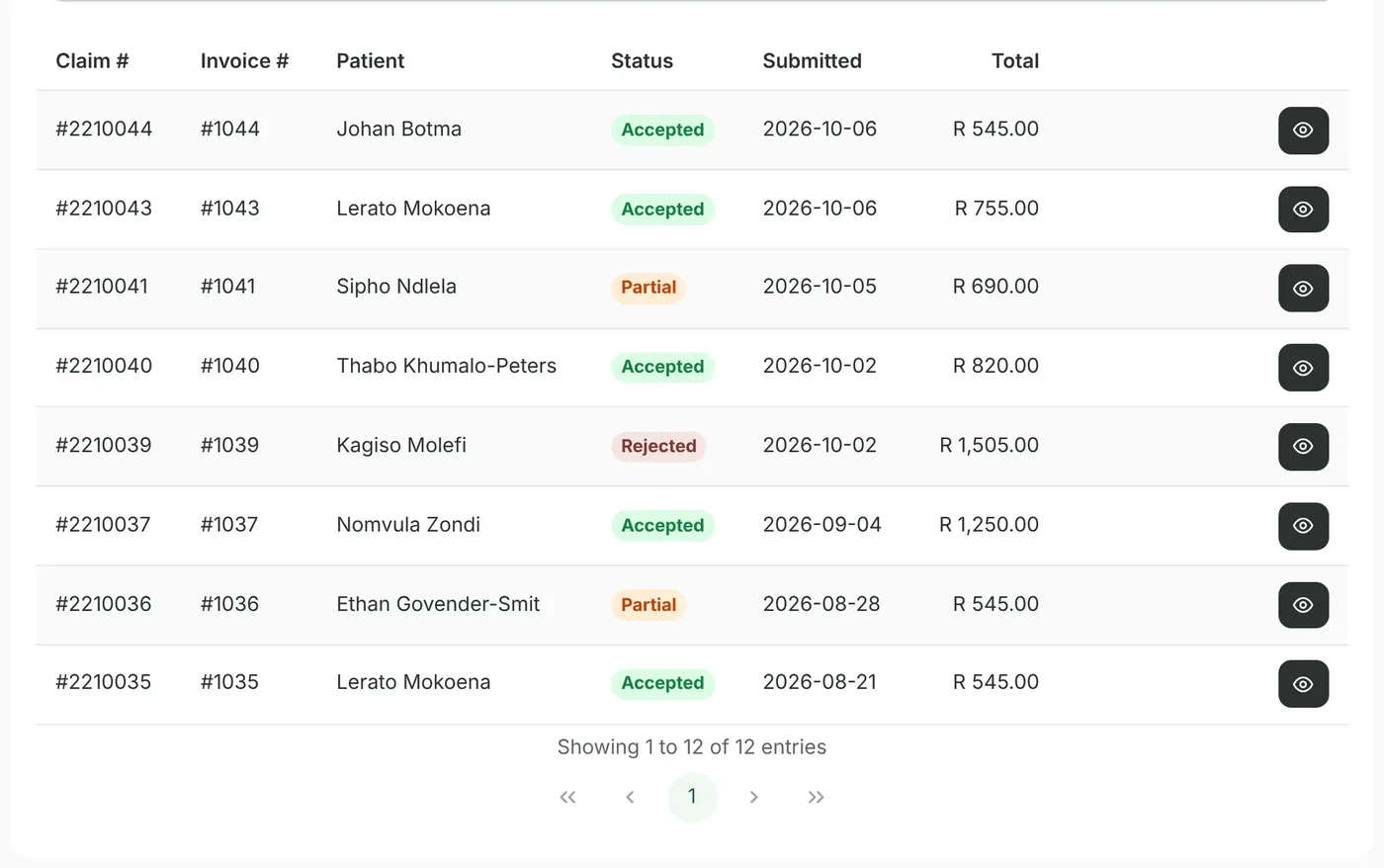
See whether each claim was accepted, partly paid, rejected or returned no benefit, with the scheme’s reason and the affected lines marked. A rejection unlocks the invoice so you can correct it and resubmit. Reverse claims the scheme has already processed.
AI claims help
Know why a claim came back, and what to do next.
Choose Help me resolve this on a rejected or short-paid claim. GreenNotes explains the scheme’s response in plain language, lists each problem with its next step, and takes you straight to the fix. For short payments, it shows what the patient owes and how to bill it.
AI explanations are based on the scheme’s response codes. Check them against the invoice before acting.
Swipe for more
Requires the Medical Aid Claims add-on, claims enrolment and authorised staff access.
From consultation to account follow-up
Every stage. One connected workflow.
Preparing the invoice is just the start. Follow the work through the claim, the payment and the next account conversation. See one consultation followed through
01Prepare the invoice
Start with the work you have already done.
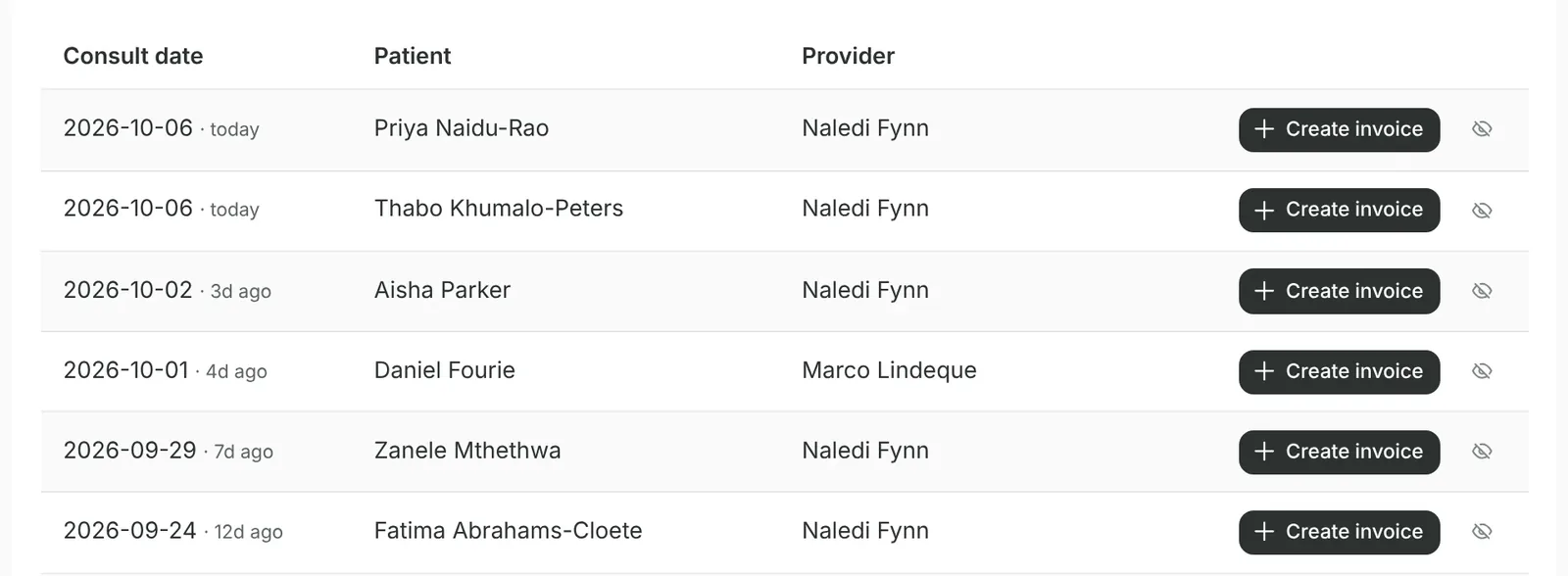
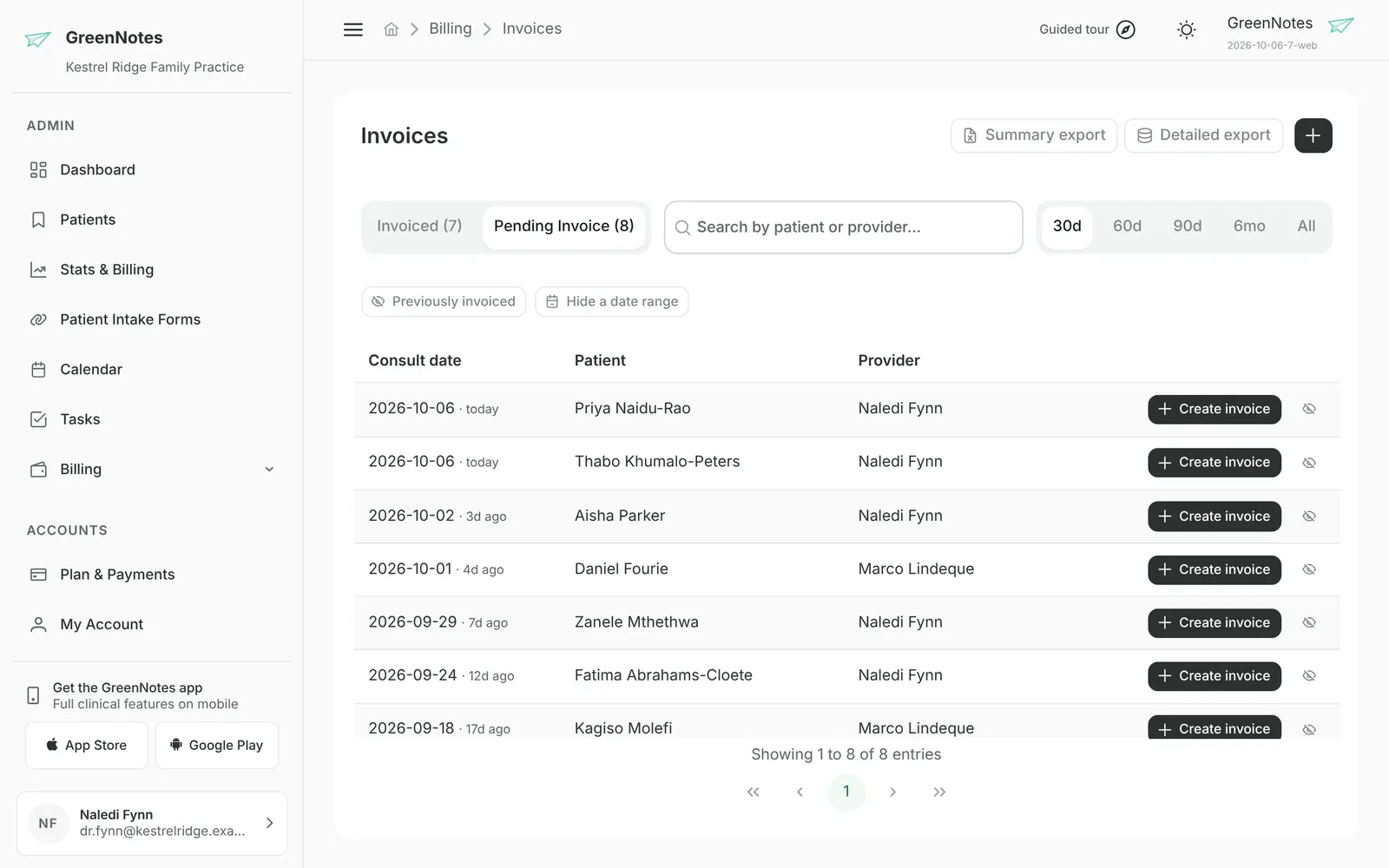
Create an invoice from a consultation to fill in patient, provider and service details. A Pending Invoice worklist shows every finished consultation not yet billed. Review recorded codes, add tariff items or reusable macros, then issue the invoice when it is ready.
Invoices are created by your team. Live Pricing (Medprax) is a separate practice-wide product for tariff and product price lookups.
The Pending Invoice worklist. Sample data.
02Validate & claim
Keep the claim connected to the invoice.
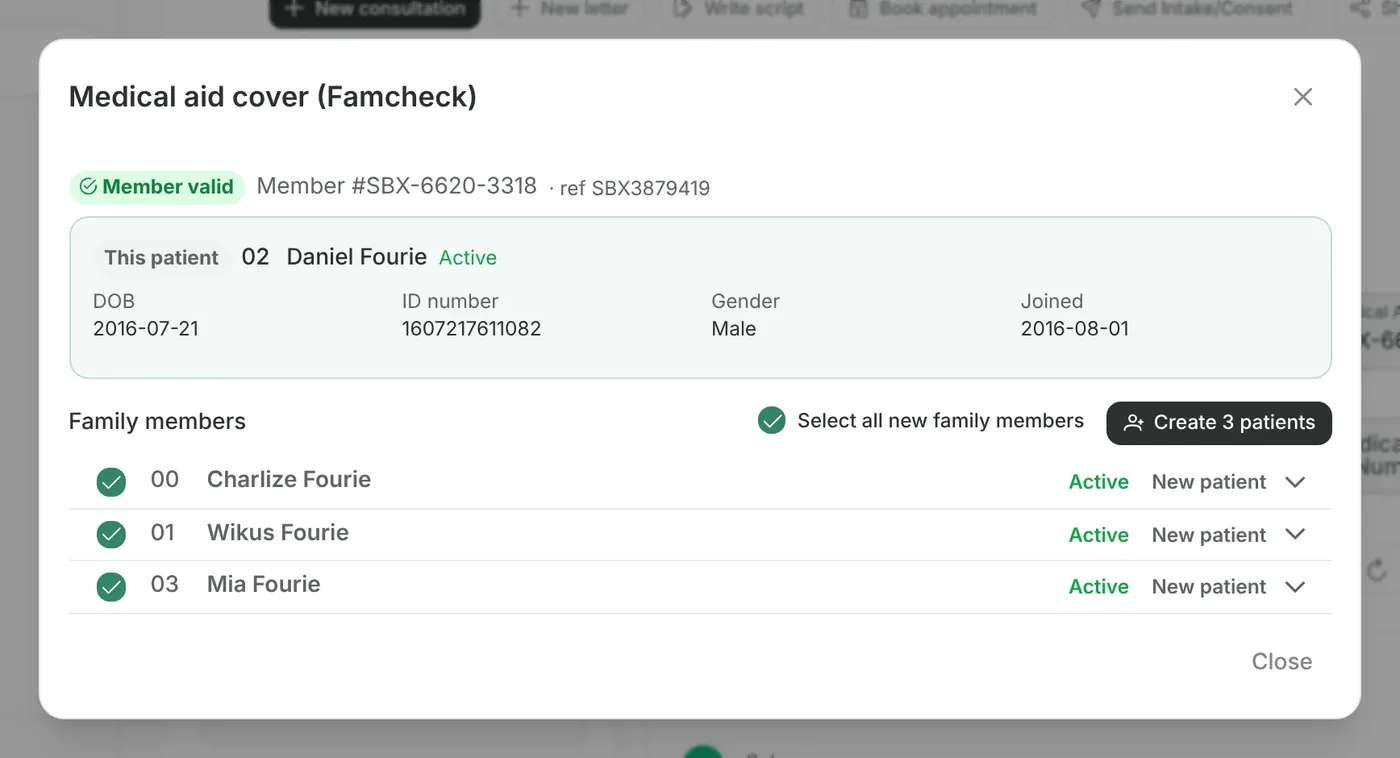
Verify cover with a FamCheck and add the rest of the family as patients in one step. GreenNotes checks the claim before you send it, then shows every claim’s status with the scheme’s reason. If a claim comes back, AI claims help explains why and what to do next.
Requires the Medical Aid Claims add-on, claims enrolment, a verified provider and authorised staff access. Membership checks do not guarantee payment.
A FamCheck, with the family ready to add. Sample data.
03Allocate payments
Know what came in, and where it belongs.
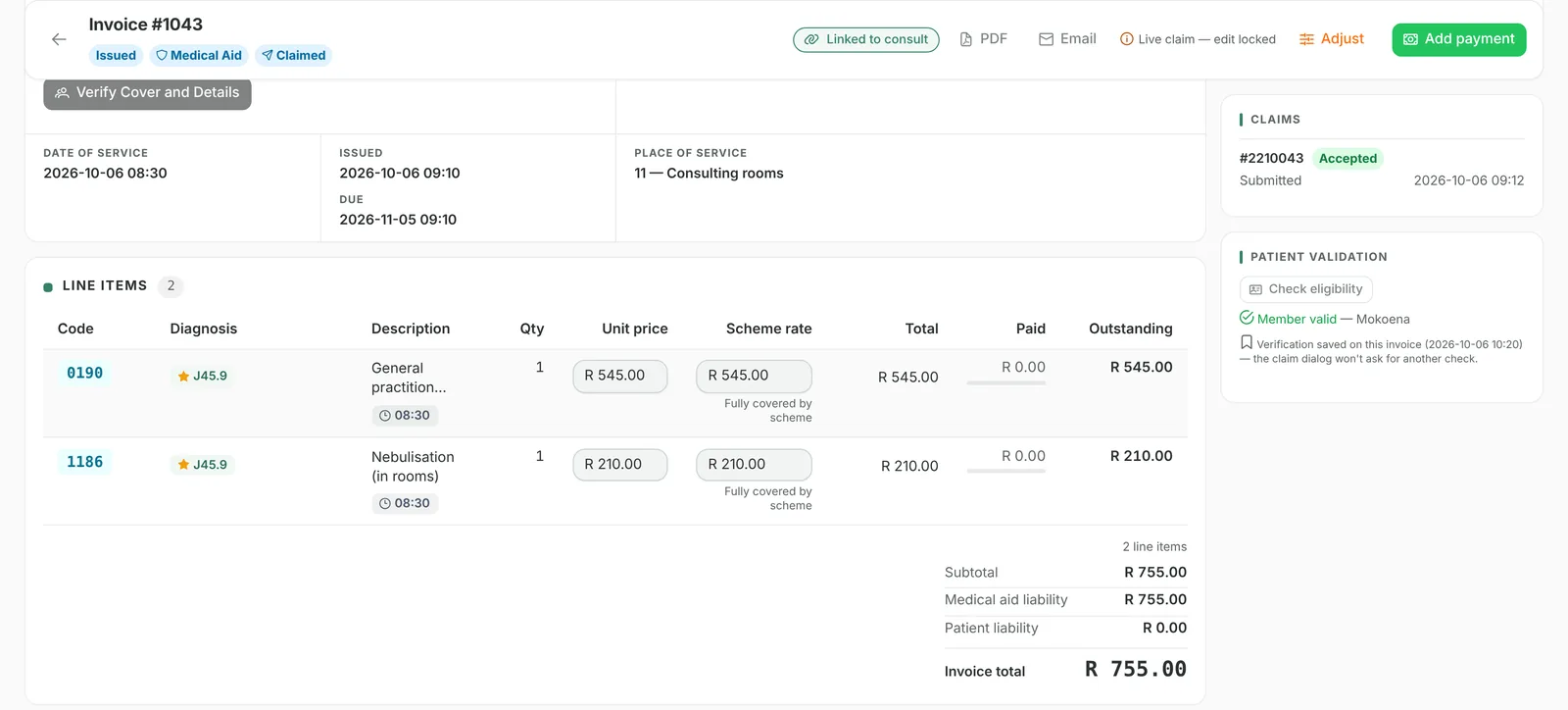
Record cash, EFT, card or medical aid payments, then allocate each receipt to invoice line items. Keep the payment reference, allocation and outstanding balance connected.
Receipt batches must balance before closing. GreenNotes records payments; your practice receives or returns the money outside the platform.
An issued invoice, line by line. Sample data.
04Follow up & report
Give every outstanding account a next step.
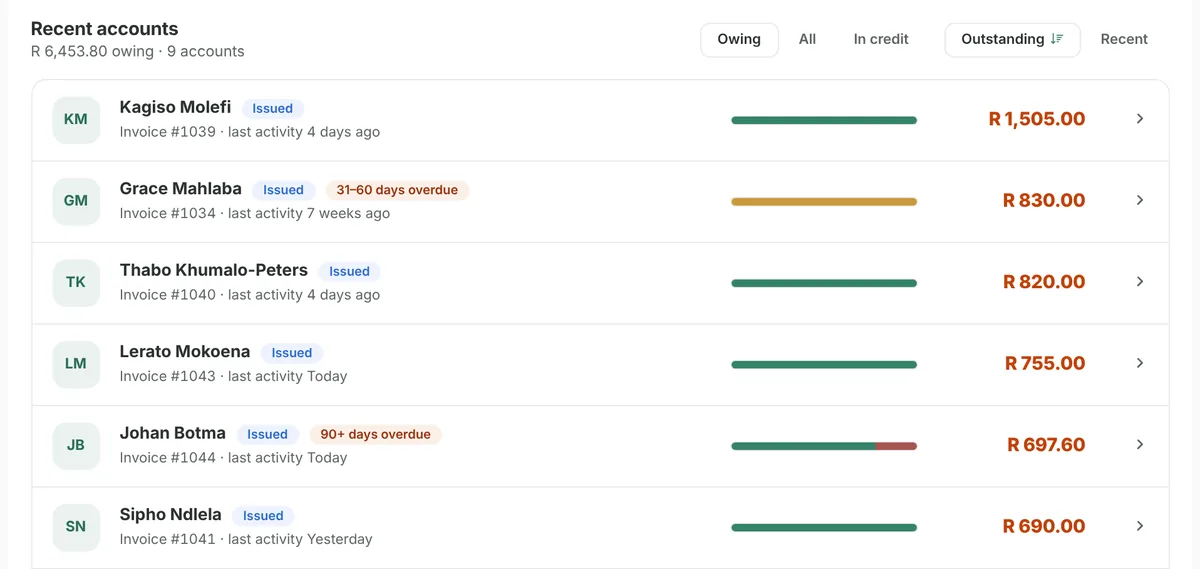
Send clear patient statements, prioritise overdue balances by age and review practice or provider reports. Keep the detail you need for daily oversight and month-end checks close at hand.
Statements retain a historical snapshot. Reports cover fees, receipts, journals, medical aids, ageing and month-end controls.
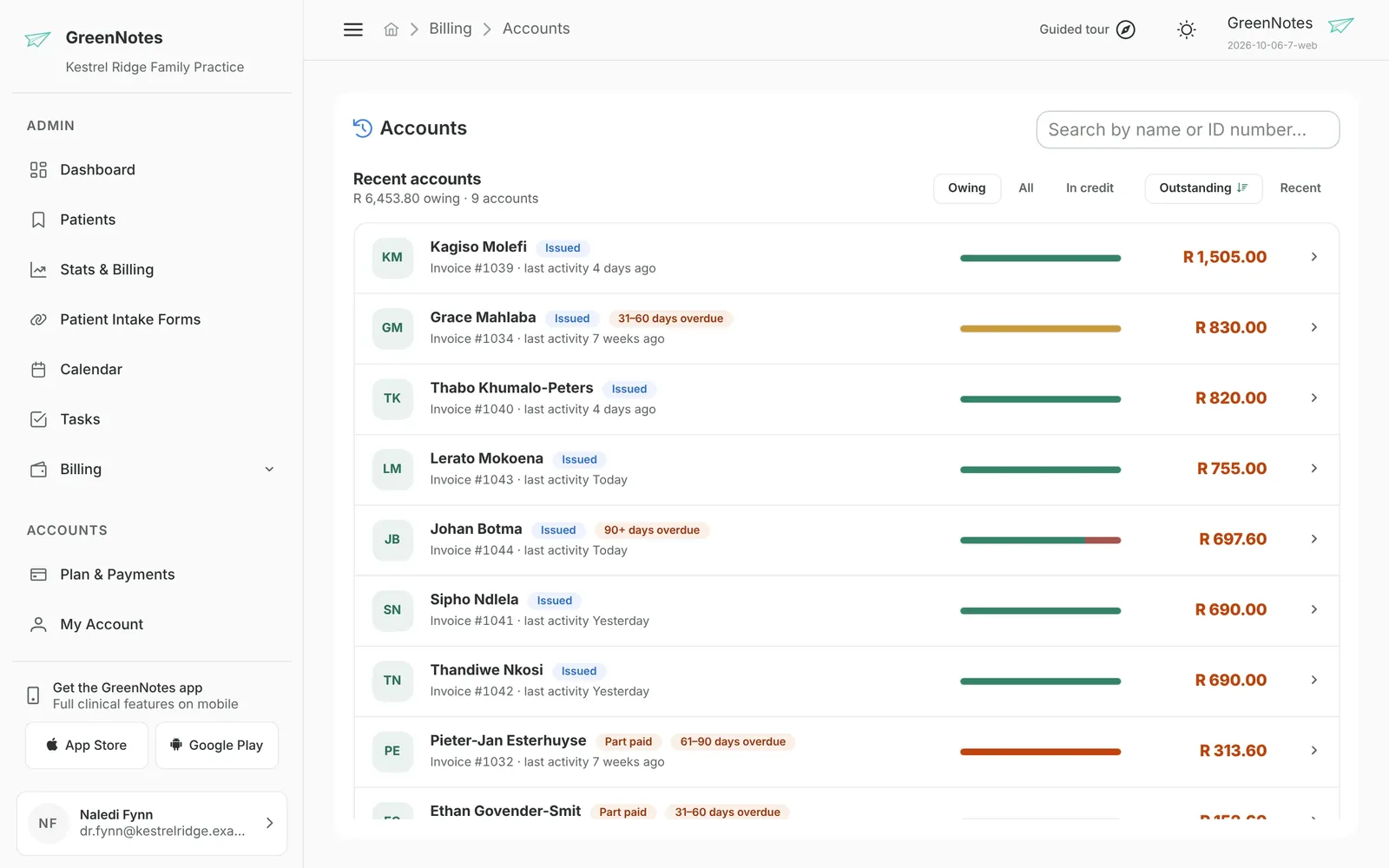
Patient accounts, by what is owed. Sample data.
app.greennotes.co.za/billing/invoices
The Pending Invoice worklist. The real GreenNotes portal, sample data.
A FamCheck, with the family ready to add. The real GreenNotes portal, sample data.
An issued invoice, line by line. The real GreenNotes portal, sample data.
app.greennotes.co.za/billing/accounts
Patient accounts, by what is owed. The real GreenNotes portal, sample data.
The whole billing picture
The details that make billing work.
From your first line item to your month-end review. Practical tools for the work around every account.
Invoice detail
Put the right detail on the invoice.
Review consultation details, diagnosis codes, tariffs, modifiers and medicines. Apply reusable macros for familiar combinations, then fetch or enter prices before issuing.
Cash invoices use your own cash price list. Live Pricing (Medprax) is a separate practice-wide product.
Electronic remittances
Understand what the scheme paid.
Retrieve electronic remittances and match them to claims and invoice items. Review short-payments, member liability and discrepancies with line-level explanations.
Included with Medical Aid Claims. Your team records payments separately.
Team permissions
The right access. For each person.
Decide who can capture payments, adjust fees, write off balances or approve refunds. Set access to view or manage each part of the billing workflow.
Keep payment capture and refund authority separate.
Receipts & refunds
Keep the money movement in view.
Allocate receipts to invoice lines, balance capture batches and track refunds through request, approval and processing against available credit.
Record the transaction. Keep its history. Your practice moves the money.
Statements & ageing
Know which accounts need attention.
Create and email statement snapshots with running balances and your overdue notices, and send billing notices by WhatsApp or SMS. Use ageing views to prioritise outstanding accounts.
Your team controls when statements are created and sent.
Practice reports
See the day. Close the month.
Explore 25 reports covering unbilled consultations, fees, receipts, journals, scheme balances and month-end controls. Filter by provider or review the whole practice.
Export reports to Excel for further analysis.
Swipe for more
Know how every balance was reached.
An auditable journal connects fees, receipts, discounts, credits, write-offs and reversals to each invoice. Corrections preserve the history, including changes to the scheme or patient share.
A traceable billing history
Your practice. Your way.
A better day on both sides of the billing desk.
For medical practices
Care comes first. The admin follows.
Keep clinical work, invoicing and account follow-up connected. Your practice team has the details to prepare invoices, record payments and take the next step on an account.
Create invoices from completed consultations
See payments and outstanding balances together
See each patient’s balance on the patient list and in their file
Practices link to your bureau with your join code, and you accept. Assign your staff to each practice, on free seats at no cost to the practice, and switch between practices in one click to work their invoices, claims and remittances.
Bureau portal for practices, staff, links and assignments
Free seats for bureau staff: no cost to the practice
The practice sees your staff and can end the link at any time
Choose the products you need. Bureau staff join your practice on free seats, at no cost to you. We confirm the figures for your practice during your demo.
Product
How it is priced
GreenNotes Billing
Per seat, for each team member who works in Billing.
Medical Aid Claims
Billing add-on: per seat, plus usage fees for claims and checks.
Live Pricing (Medprax)
Practice-wide subscription, with no per-member seat.
GreenNotes Billing covers itemised invoices, line-level payment allocation, receipt batches, a financial journal, refunds, patient statements, debt ageing and 25 financial reports. Reusable macros help with invoice preparation. Medical Aid Claims is an add-on to Billing; Live Pricing (Medprax) is a separate, practice-wide product. We will help you choose the products and setup for your practice.
How do consultations become invoices?
You create an invoice from a consultation, or link a consultation in the invoice editor. GreenNotes uses the consultation to fill empty fields such as patient, provider, service date, referring doctor and recorded diagnosis or billing codes. You review the details and issue the invoice. Nothing automatically creates an invoice. The Pending Invoice worklist helps identify consultations still to be billed.
Which codes carry across from the clinical note?
ICD-10 diagnosis codes recorded in the consultation can carry into the invoice, including codes included by the clinical AI. Recorded billing codes can also carry across. You review the invoice and select or adjust its tariff items and modifiers. GreenNotes Billing does not currently generate AI tariff suggestions.
How do Medical Aid Claims and Medprax differ?
Medical Aid Claims is a per-seat add-on to GreenNotes Billing, with usage fees. Your practice needs claims enrolment, a verified provider, and the appropriate subscriptions, staff seats and claims permission. GreenNotes assists with enrolment. Live Pricing (Medprax) is an independent practice-wide subscription with no per-member seat; it provides tariff and product price lookups. We will explain setup and costs during your demo.
How do medical aid claims and patient checks work?
With Medical Aid Claims enabled and enrolment complete, authorised staff can run a FamCheck to verify cover and family details, add dependants as patients in one step, submit a claim from an issued invoice and receive the adjudicated response. Every claim shows its status: accepted, partial, no benefit, rejected, duplicate or error. Claim reversals are also supported. A membership check does not guarantee benefits or payment. We will confirm the schemes and options you need during your demo.
How does GreenNotes help prevent claim rejections?
Before you send a claim, GreenNotes checks it for problems that commonly cause rejections: a missing or invalid ICD-10 code, a line with no tariff or product code, a line priced at R 0.00, no medical aid member number, a service date in the future or more than four months ago, and a time-based modifier without a start and end time. Each problem links to where you fix it.
What happens when a claim is rejected or paid short?
GreenNotes shows the scheme’s verdict and reason on the claim, with the affected lines marked. A rejection unlocks the invoice so you can correct it and submit a new claim. Choose Help me resolve this and GreenNotes explains the response in plain language, groups the problems by invoice line and links each one to where it is fixed. If part of a claim is the member’s to pay, it shows how much, so you can bill the patient. Check AI explanations against the invoice before acting.
How do electronic remittances help with reconciliation?
With Medical Aid Claims, GreenNotes retrieves electronic remittances (ERAs) and matches them to claims, invoices and line items. Review scheme payments, member liability, short-payments and discrepancies with line-level explanations. Retrieval and reconciliation do not record a payment or change the financial journal: your team records and allocates the money separately.
Does GreenNotes collect payments or send refunds?
GreenNotes records payments and their allocations; it does not process patient payments or move money. Cash, EFT, credit card and medical aid are recording categories. Refunds follow a requested, approved and processed workflow. Your practice returns the money outside GreenNotes, then records the processed refund and reference against the available invoice credit.
Can I send patient statements and track overdue accounts?
Generate a statement with invoice detail, journal movements and running balances, then export a PDF or email it, and send billing notices by WhatsApp or SMS. Each statement is a frozen snapshot. You can configure 30-, 60- and 90-day overdue notices to appear on statements. Sending statements and following up remain manual. The ageing dashboard and more detailed age-analysis report help prioritise outstanding accounts.
Can my billing bureau work with my practice, and what does it cost the practice?
Yes. The practice sends a link request using the bureau’s join code, and the bureau accepts it. The bureau then assigns its staff to the practice on free seats, at no cost to the practice. Staff work in each practice’s billing screens under its normal membership permissions, and the practice can end the link at any time. This provides controlled practice access; it does not include a consolidated financial dashboard across practices.
Can an issued invoice be corrected?
Yes. Permitted edits to issued, partially paid or paid invoices are recorded through journal movements that preserve the original charge and the adjustment history. Patient and provider cannot change after issue, and charge edits are blocked while a live claim holds the invoice. Credits are journal movements rather than separate credit notes. Payment corrections use reversals, with permissions controlling who can make each kind of change.
Let’s connect the dots
Your next chapter. With less admin.
Walk through your billing day, from the first invoice to payments, patient accounts and month-end.