Clinical notes to medical-aid claims
One consultation, followed through to payment.
In GreenNotes, the details recorded in a consultation carry into the invoice, the invoice becomes the medical-aid claim, and the claim’s response and payment stay attached to the same account. People still create the invoice, check the codes, submit the claim and record the payment. This page follows one illustrative consultation through all eight stages.
The example
A GP consultation at a sample practice.
Kestrel Ridge Family Practice is a sample practice: one GP, a front-desk administrator and a part-time bookkeeper. It uses GreenNotes Clinical, GreenNotes Billing and the Medical Aid Claims add-on, and has completed claims enrolment.
The patient is a synthetic adult medical-aid member with sinus symptoms. Everything she says, and every code and amount, is illustrative.
Eight stages
What carries across, and who does what.
Each stage names the product it needs. Stages 3 to 8 need GreenNotes Billing; stages 5 and 6 need the Medical Aid Claims add-on.
Intake and the consultation.
A medical-aid member books a GP appointment for twelve days of blocked nose and facial pain. Before the visit she completes the practice’s intake form from a link. In the room, the GP explains that the consultation will be recorded for the notes, and she agrees.
What GreenNotes doesHolds the appointment and sends the scheduled reminder by email, WhatsApp or SMS. Sends the intake form link so the patient can complete her details before the visit. Records the consultation on a phone or in the browser.What your team doesBook the appointment, send the intake or consent link, tell the patient about the recording and obtain consent, start and stop the recording.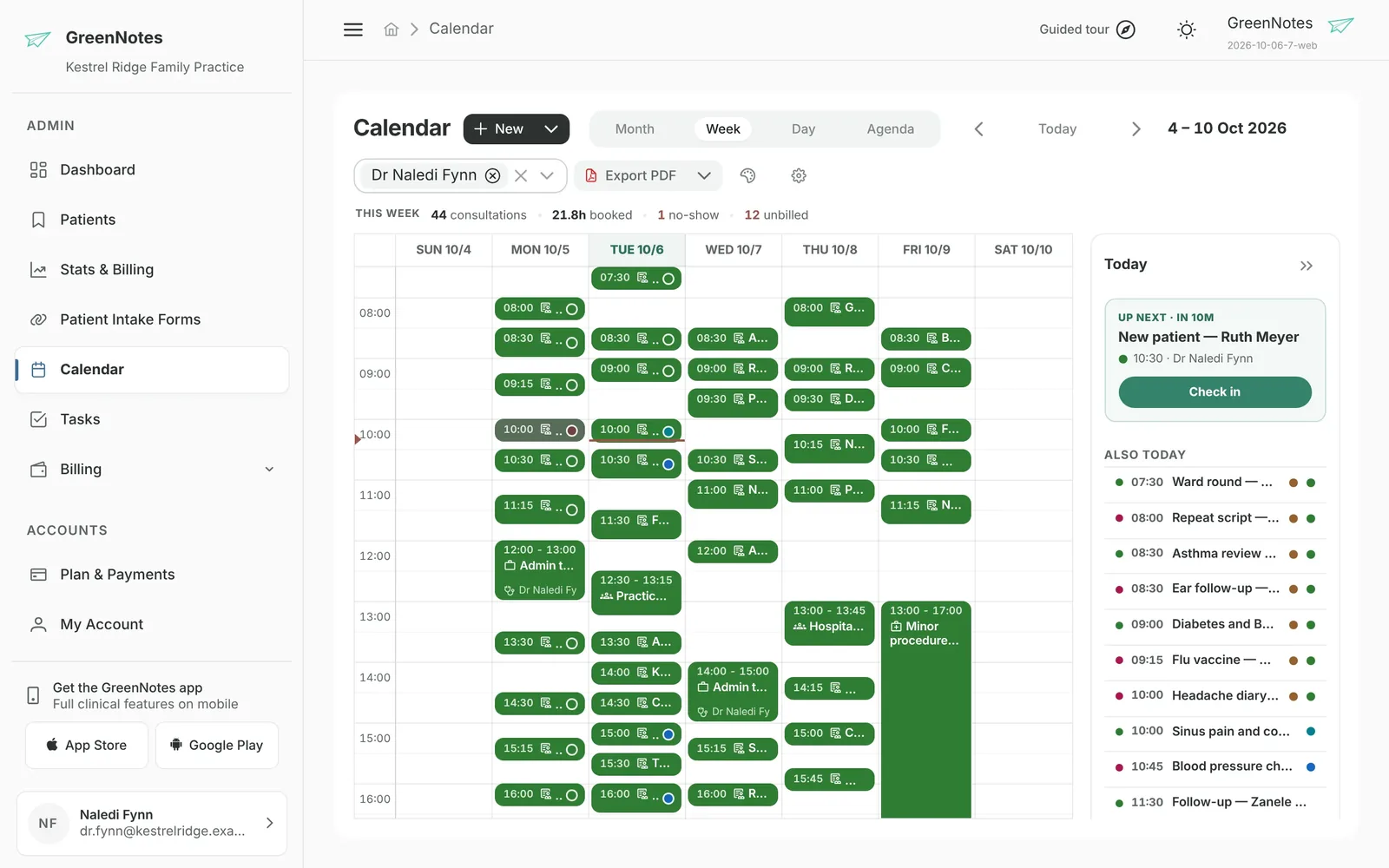
The real web portal, sample data.
The AI note, reviewed by the clinician.
The GP transcribes the recording as a structured summary in English with SOAP headings and ICD-10 codes switched on. The draft records acute bacterial sinusitis (J01.9) and the plan, including a penicillin allergy. She corrects one dose and saves.
What GreenNotes doesTranscribes the recording and drafts the note under the chosen headings, in the chosen output language. Includes ICD-10 codes if asked. Can draft a sick note or referral letter from the note.What your team doesRead and edit the note. The clinician remains the author of the record and is responsible for its accuracy.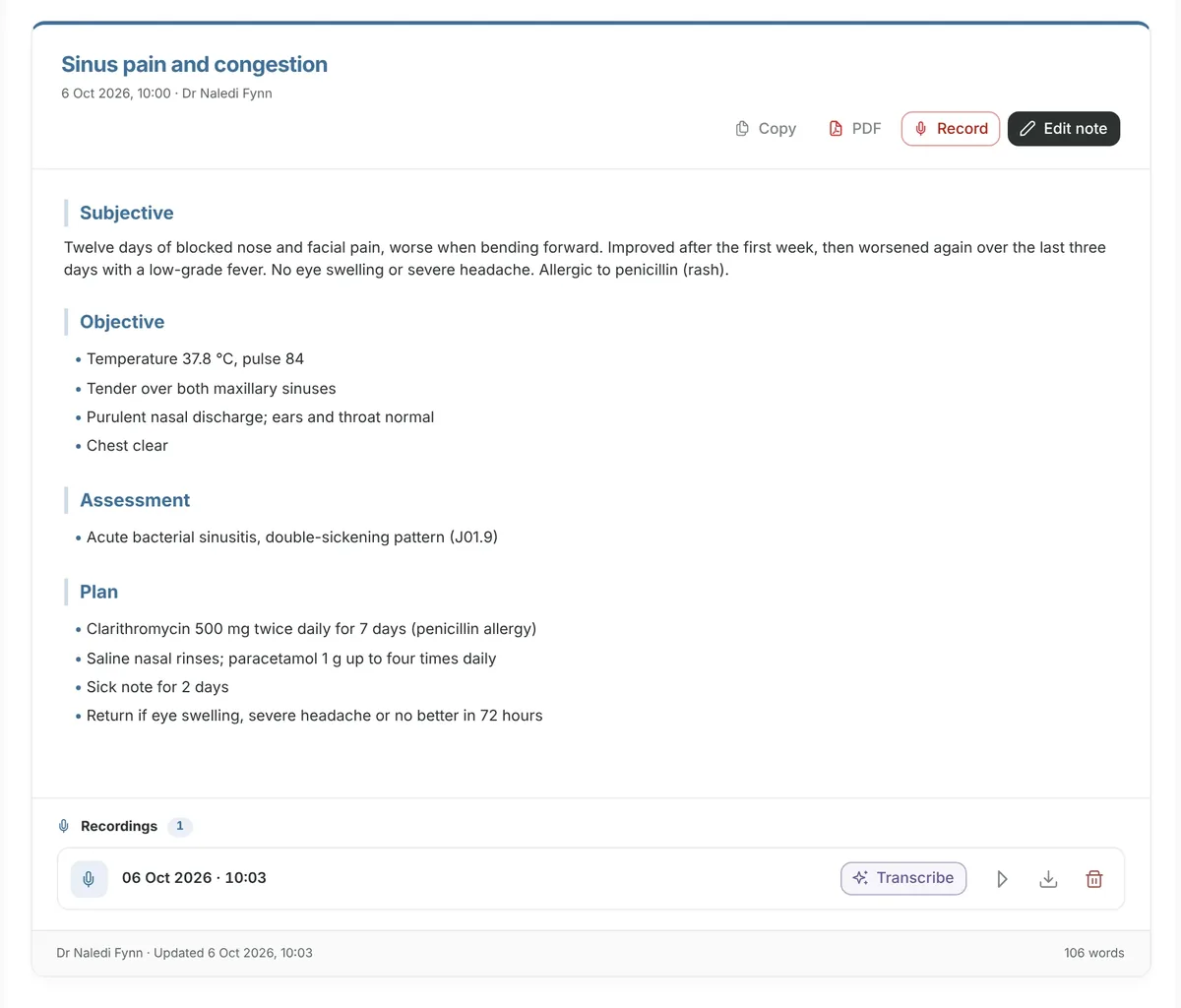
The real web portal, sample data.
The invoice, prepared from the consultation.
At the end of the day the front desk opens the Pending Invoice list, where the consultation is waiting, and chooses Create invoice.
What GreenNotes doesLists finished consultations that have not been billed. Creating the invoice fills its empty fields from the consultation: patient, provider, service date, referring doctor and the recorded diagnosis and billing codes.What your team doesChoose which consultations to invoice and when. Nothing creates an invoice automatically.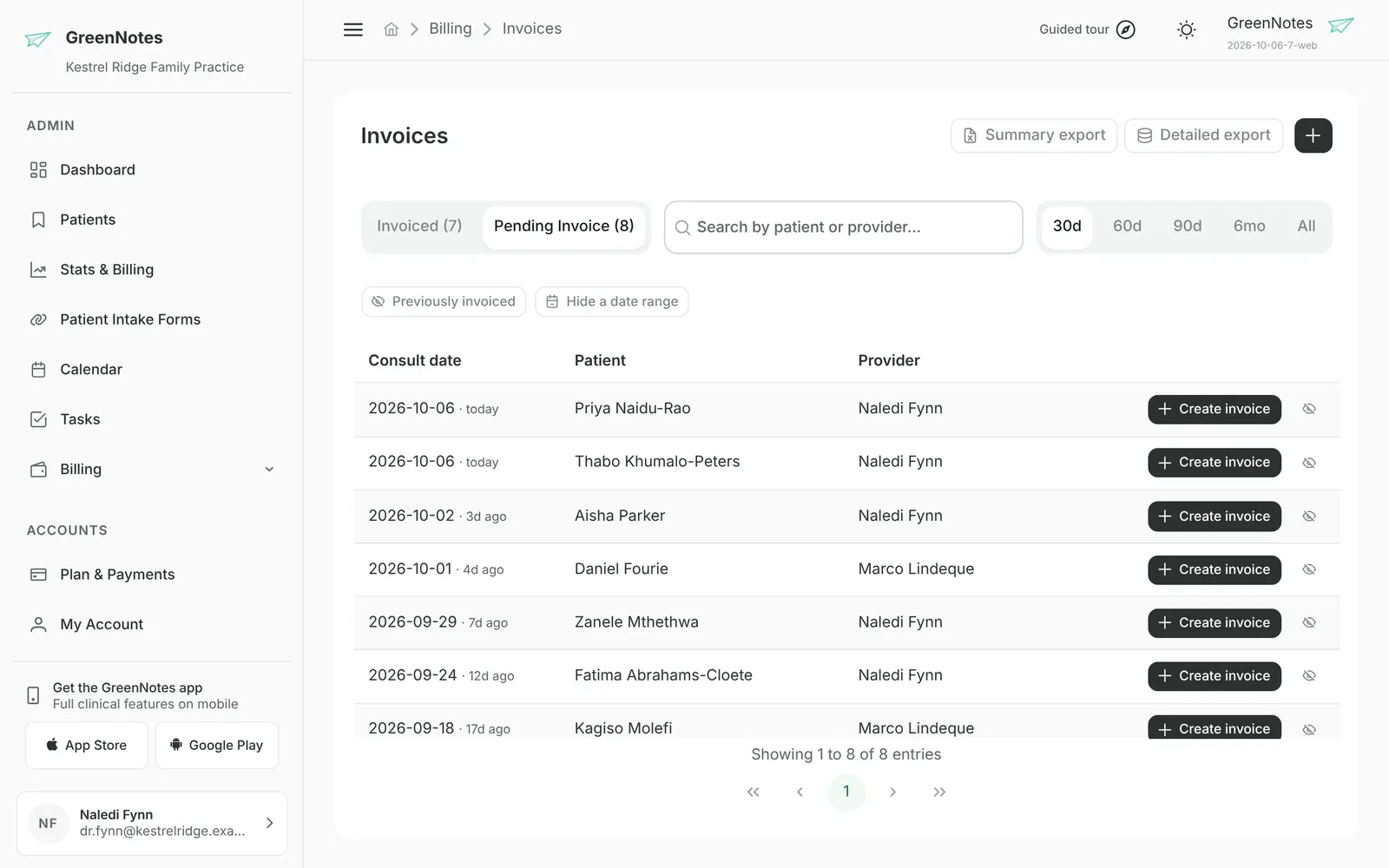
The real web portal, sample data.
People review the items and codes.
The front desk adds the consultation tariff item, checks that J01.9 is on each line, confirms the price and issues the invoice.
What GreenNotes doesApplies reusable macros for familiar combinations. Fetches prices if the practice subscribes to Live Pricing (Medprax), or uses the practice’s own cash price list. Keeps a journal of every later change.What your team doesSelect or adjust tariff items, modifiers, medicines and prices, then issue. GreenNotes does not suggest tariff codes with AI.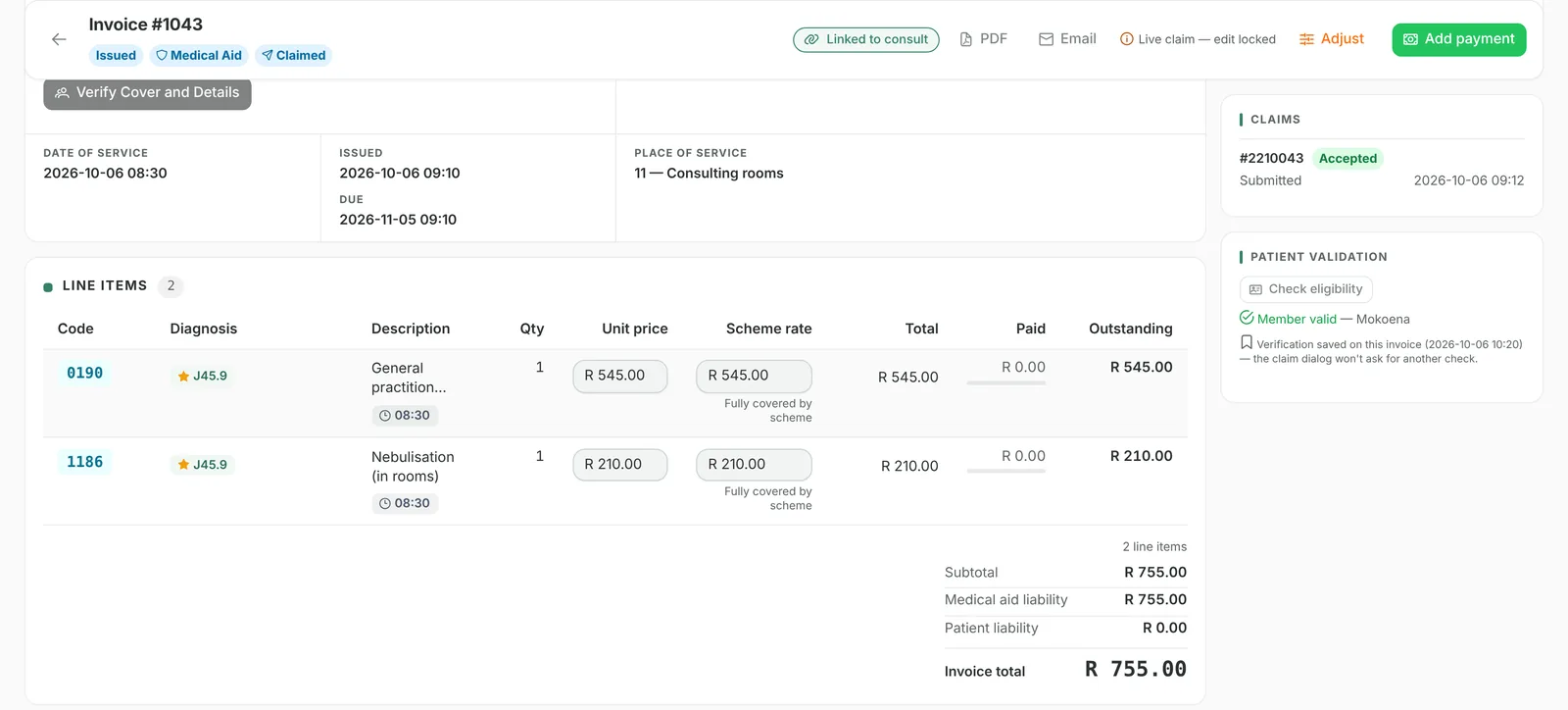
The real web portal, sample data.
The claim, when the prerequisites are met.
Because the practice has Medical Aid Claims and completed claims enrolment, the front desk runs a FamCheck, which confirms membership, then submits the claim. The pre-submission checks flag nothing.
What GreenNotes doesRuns FamCheck cover and family checks. Before sending, checks for common rejection causes: a missing or invalid ICD-10 code, an uncoded or R 0.00 line, no member number, a service date in the future or more than four months ago, a time-based modifier without times.What your team doesRun the check, fix anything flagged, and submit. Needs the Medical Aid Claims add-on, claims enrolment, a verified provider and claims permission. A membership check does not guarantee payment.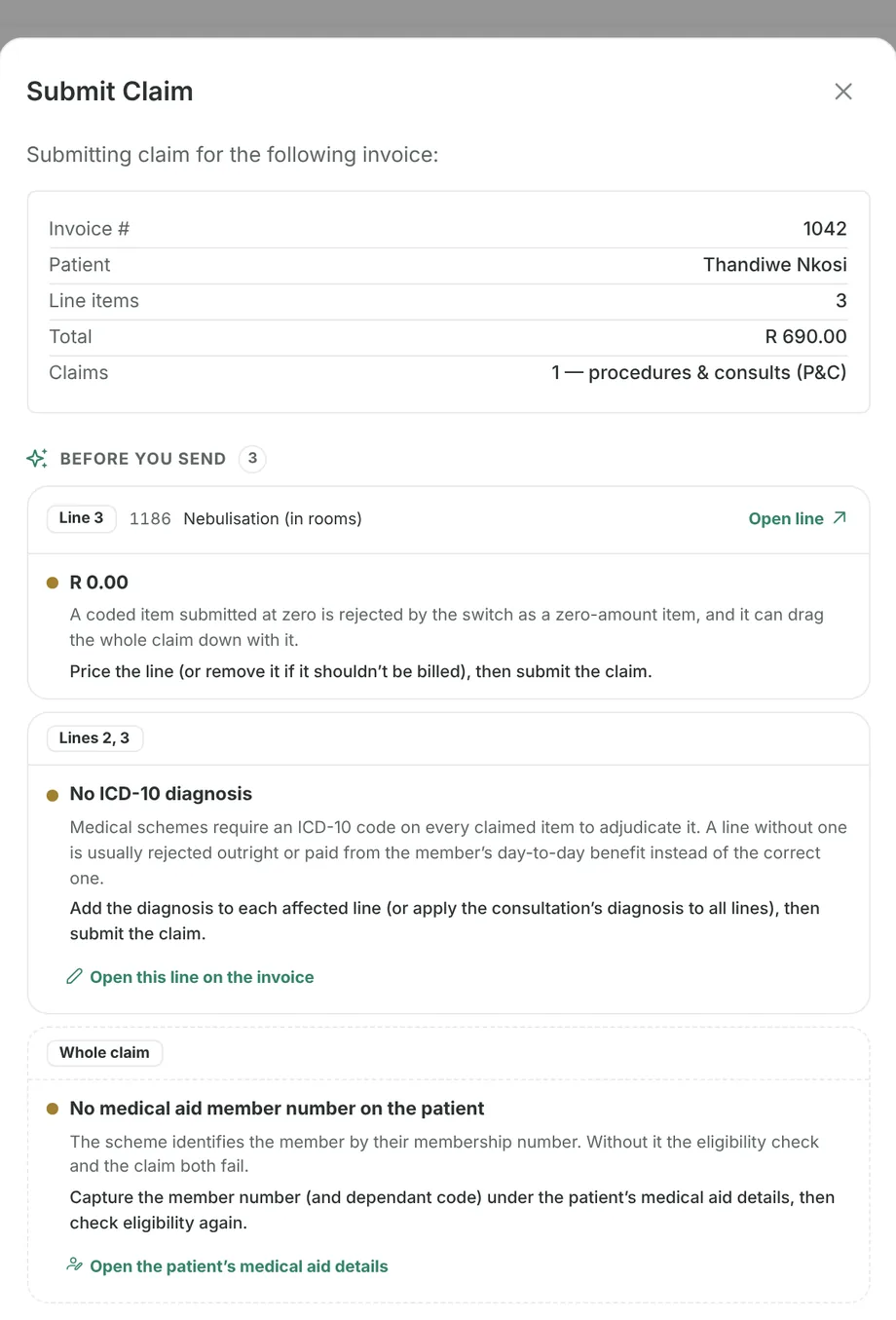
The real web portal, sample data.
The scheme’s response and the remittance.
The scheme accepts the claim. On another claim that day, rejected for a date-of-birth mismatch, the front desk opens Help me resolve this, corrects the patient file and submits a new claim.
What GreenNotes doesShows each claim’s status (accepted, partial, no benefit, rejected, duplicate or error) with the scheme’s reason. A rejection unlocks the invoice. AI claim help explains the response in plain language and links each problem to its fix. Retrieves electronic remittances (ERAs) and matches them to claims and lines.What your team doesCheck AI explanations against the invoice before acting, correct and resubmit. Reconciling a remittance does not record the payment: that is the next step.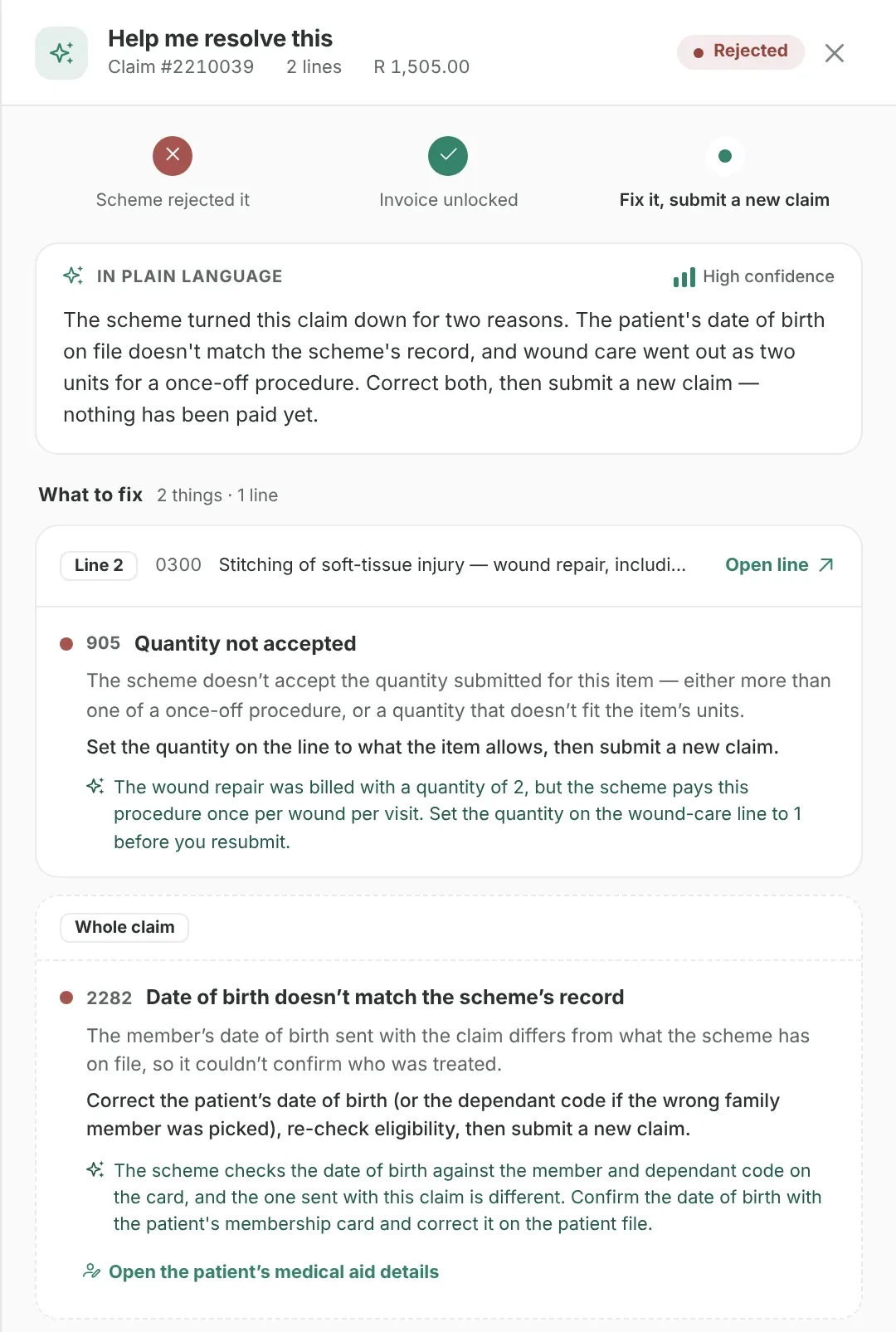
The real web portal, sample data.
Payment recorded and allocated.
When the scheme pays, the bookkeeper records the medical-aid receipt and allocates it to the invoice lines. The invoice shows nothing outstanding.
What GreenNotes doesRecords cash, EFT, card and medical-aid payments and allocates them to invoice lines. Receipt batches must balance before closing. Refunds follow a request, approval and processing workflow.What your team doesReceive or return the money outside GreenNotes, then record it. GreenNotes does not process payments or move money.The real web portal, sample data.
Statements and account follow-up.
For a different patient, the scheme paid short. The practice bills the member’s portion, and at month-end sends a statement and works the ageing list from the oldest balance down.
What GreenNotes doesCreates statement snapshots with running balances and your 30-, 60- and 90-day overdue notices, exports them as PDF or emails them, and sends billing notices by WhatsApp or SMS. Ageing views and 25 reports help prioritise.What your team doesDecide when statements go out and how to follow up. There is no automated debt collection.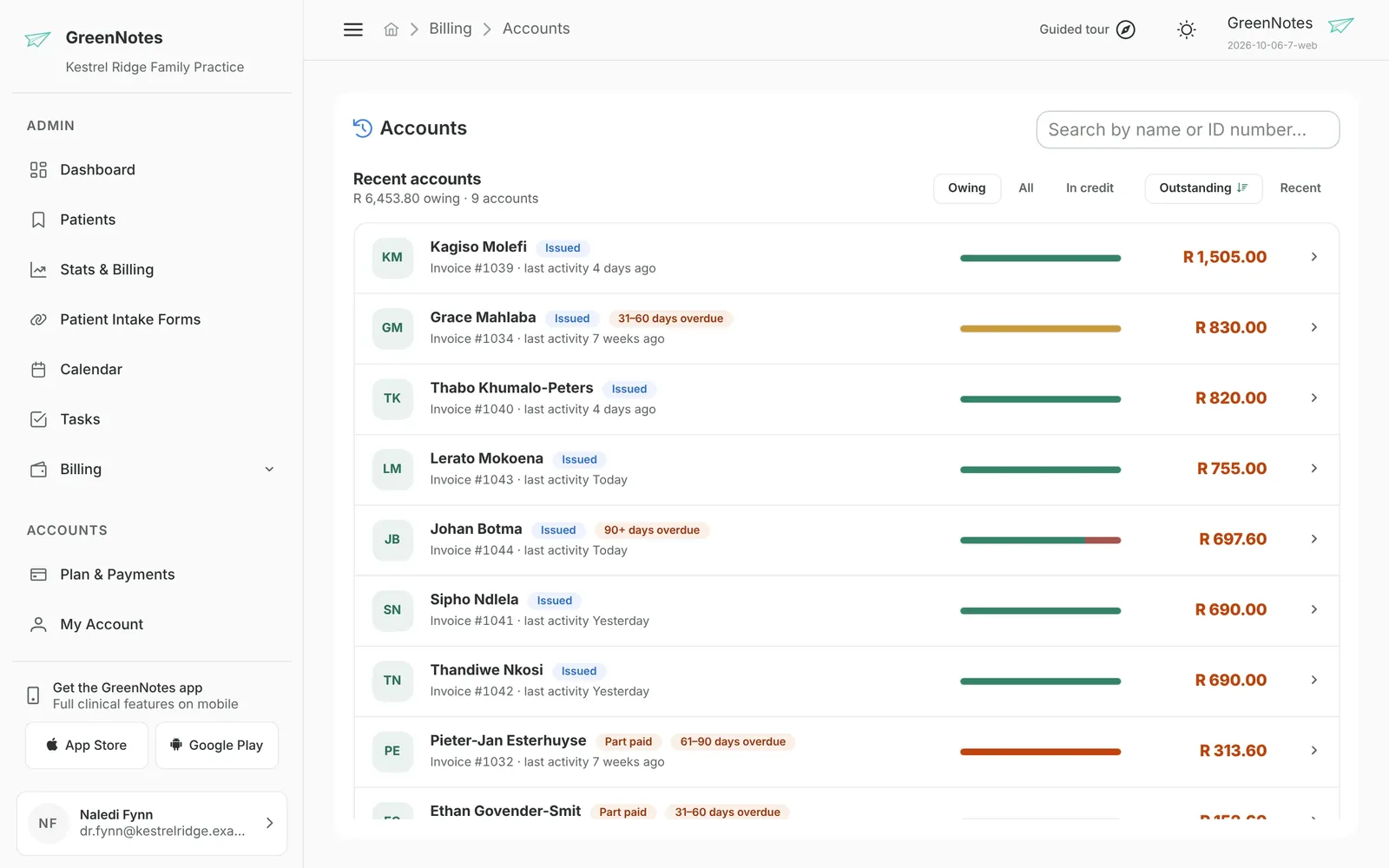
The real web portal, sample data.
The real web portal, sample data.
At a glance
What carries across. What stays with you.
| Information | What GreenNotes carries across | What your team does |
|---|---|---|
| Patient details | From the patient record into the invoice | Keep demographics and medical-aid details up to date |
| Provider, service date, referring doctor | From the consultation into the invoice | Check them before issuing |
| Diagnosis (ICD-10) codes | Codes recorded in the consultation, including codes the clinical AI included | Confirm each line has the right code |
| Billing codes recorded in the consultation | Into the invoice | Select or adjust tariff items, modifiers and prices |
| Invoice to claim | The claim is built from the issued invoice | Run checks and submit |
| Remittance to claim | ERAs are matched to claims, invoices and lines | Record and allocate the payment separately |
| Balances to statements | Statements include invoice detail, journal movements and running balances | Create and send statements, follow up |
Questions
Good questions. Straight answers.
Does GreenNotes turn a clinical note into an invoice automatically?
No. A finished consultation appears on the Pending Invoice list, and someone in the practice chooses Create invoice. GreenNotes then fills the invoice’s empty fields from the consultation, including patient, provider, service date, referring doctor and recorded diagnosis and billing codes. You review the items and prices and issue the invoice.
Which codes carry from the clinical note to the invoice?
ICD-10 diagnosis codes recorded in the consultation, including codes the clinical AI included, and billing codes recorded in the consultation. Tariff items, modifiers and prices are selected or adjusted by your team. GreenNotes Billing does not generate AI tariff suggestions.
What do I need before I can submit medical-aid claims?
GreenNotes Billing, the Medical Aid Claims add-on, claims enrolment (GreenNotes assists), a verified provider, and claims permission for each staff member who submits claims. Medical Aid Claims is priced per seat plus usage fees for claims and checks.
Does a FamCheck mean the scheme will pay?
No. A FamCheck confirms membership and family details at the time of the check. Benefits and payment are decided by the scheme when it adjudicates the claim.
Does GreenNotes collect payments from patients or schemes?
No. GreenNotes records payments and allocates them to invoice lines. The money is received or refunded outside GreenNotes. Electronic remittances are matched to claims, but reconciling a remittance does not record a payment.
Can a billing bureau do the billing steps for us?
Yes. Your practice links to the bureau with its join code, and the bureau assigns staff to your practice on free seats, at no cost to the practice. They work in your billing screens under your permissions, and you can end the link at any time.
Is the example on this page a real practice?
No. The patient and the practice are synthetic and the timings are illustrative. The screens are the real GreenNotes web portal with sample data, taken from different sample patients. The example does not describe measured results.
See it with your own billing
Walk through your billing day with us.
Book a personal online demo of GreenNotes Billing and Medical Aid Claims, or see the whole platform first.